So when it comes to creating and editing in photoshop there’s so much you can do in it. No that’s not a “sky’s the limit” sentence, I literally mean there’s a lot of things you can do in this program, so much so that photoshop has different ways to edit. Think about this, you pull up an image and you want to change the color or make it darker/lighter, you can just change the hue/saturation or set the black&white tone but that will change the whole image. That is called destructive editing when you do that, you change the whole image and you can’t do much with it except undo. This happens because you save directly over the original image and now you can’t make changes to the original image.
Man you screwed up now, so what can you do about it?
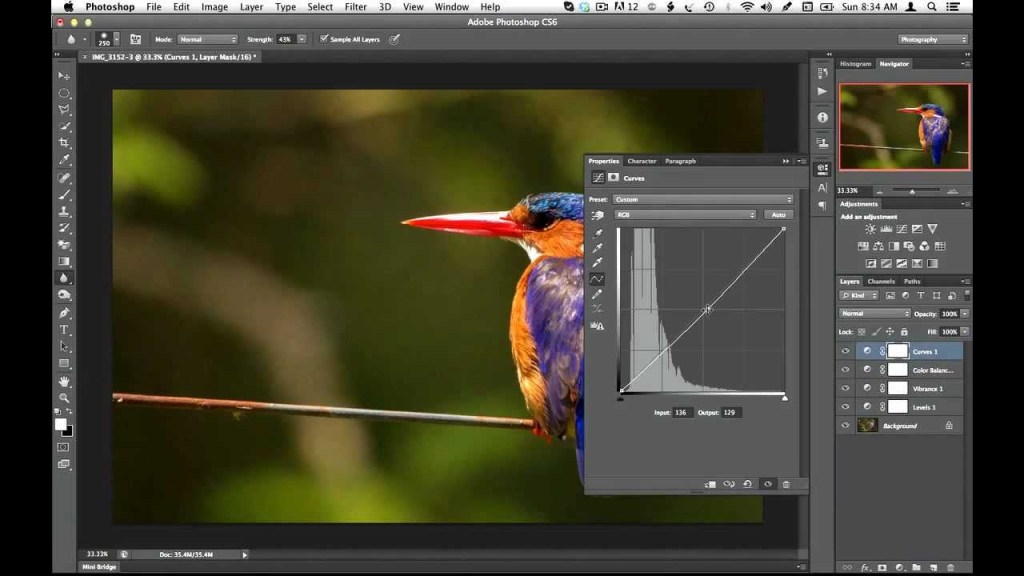
Non-destructive editing (as seen as above) can save your life. This form of editing is what you can use to make changes to your picture without completely changing it. Applying a layer mask is a way of adding changes with out the change, basically “touching” it. Think of it as an edit “screen over the picture”. Use non-destructive editing for bigger, more complicated edits.
Vectors and rasterized graphics
Rasterized graphics (or bitmap images) are made by a map of bits within a rectangular grid of pixels or dots. Vector images are composed of lines, shapes, and other graphic image components stored in a format that incorporates geometric formulas for rendering image elements.
Vectors are math based and defined by paths so that they don’t look pixelated when scaled too much. These things are used best for logos.
The reason why you would rasterize a vector layer in photoshop is to properly use tools to edit images as some editing directions require you to rasterize, converting your images to pixels. This will happen when you want to do edits like change color using the paint bucket tool; you can still change the vector color using the properties tab but you still might need to convert for other editor tools.
Again there are a multitude of ways to use photoshop but the best way to use it is the way that you know how, and to avoid less heartache is by using non-destructive methods for serious editing.
And that is how I photoshop, how do you photoshop?
 Henry Iglesia